A free, easy Gantt project planner in your browser
Gantton turns a list of tasks into a Gantt chart you can read at a glance. No signups, no accounts, no cloud: your project files stay on your computer. Plan the work, work the plan.
Start planning: it's free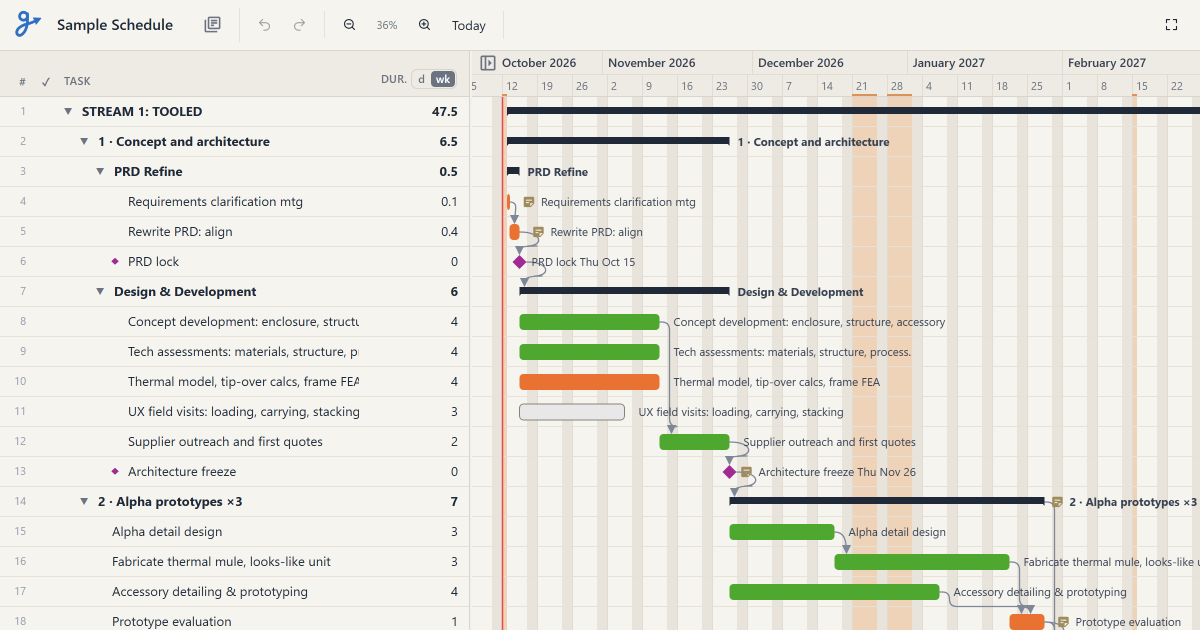
What you can do with it
- Plan in phasesIndent tasks under a phase. Its bar follows the tasks inside it.
- Link tasksA task can wait for another to finish. Move one and the rest of the plan follows.
- Days or weeksType durations like 3d, 2w or 1.5wk. Weekends are skipped, and so are the holidays you choose.
- Track progressTick tasks off or set a percentage complete. Ticking a phase completes everything in it.
- Colours and notesColour tasks by team or type, name what each colour means, and keep notes on any task.
- Paste a listCopy lines from Word, Notepad or Excel and paste them in: each line becomes a task.
- Find anythingCtrl+F searches task names, and notes too in the full view.
- Export and shareSave to Excel, PDF or PNG, or share a view-only copy anyone can open in a browser.
Your projects stay on your computer
Gantton runs entirely in your browser. Your projects are kept in My Project Files, inside the browser on your own computer, and every change is saved automatically. Their contents are never sent anywhere: we couldn't see your plans even if we wanted to.
In Chrome and Edge, Auto Back-Up saves a copy of all your projects to a folder you choose, such as one in Dropbox or OneDrive. In other browsers, one click backs everything up to a single zip file.
Questions
- Is Gantton free?
- Yes. There's no account, no subscription and nothing to install.
- Do I need to sign up?
- No. Open gantton.app and start planning. There are no signups and no emails.
- Where are my projects saved?
- In your browser, on your computer, in My Project Files. Another browser or computer has its own separate set; restore a backup there to move your projects across.
- Which browsers does it work in?
- Current Chrome, Edge, Safari and Firefox on a computer. Automatic backups to a folder need Chrome or Edge.
- Can I share a plan with someone who doesn't use Gantton?
- Yes. Export a view-only HTML file: they can open it in any browser, zoom, collapse phases and read notes. Or send a PDF or Excel file.
- Is there an example to try?
- Yes. Gantton comes with a sample project you can change freely; it always goes back to how it came.